


Compatibility testing ensures that your software works across various devices, browsers, and operating systems without issues. Imagine an app running flawlessly on a new iPhone but crashing on an older Android phone is a nightmare for developers. Compatibility testing ensures your applications work seamlessly across all platforms and environments, offering a consistent user experience regardless of the device or network conditions. It’s essential to identify issues before release to ensure smooth performance.
With over 4.4 billion smartphone users and people owning multiple connected devices, compatibility issues are inevitable. Statista and GlobalWebIndex report a rise in mobile app usage across smartphones, tablets, laptops, and desktops. This growing fragmentation makes it critical to ensure your app works across all these devices. A survey by Sauce Labs found that 40% of users won’t return to a website after a bad experience, highlighting the importance of compatibility testing.
60-second summary
Compatibility testing ensures your app works smoothly across all devices, browsers, and operating systems. With billions of users and a wide variety of hardware and software, it’s crucial to deliver a consistent experience. This type of testing checks performance under different environments, such as Wi-Fi vs 5G, Chrome vs Safari, or Android vs iOS, and helps catch bugs before launch. It includes types like forward/backward compatibility, device testing, browser testing, and more. Without it, you risk crashes, broken features, or poor UX, which can lead to lost users. Done right, compatibility testing boosts reliability, trust, and user satisfaction.
What is Compatibility Testing?
Compatibility testing is a vital non-functional test that ensures your software or product works efficiently across a range of platforms, devices, browsers, and operating systems (OS). The goal is to verify that the applications perform as expected, providing a consistent and seamless user experience across different network conditions, hardware configurations, and software environments. It helps identify potential discrepancies early, ensuring the app meets customer expectations for usability, performance, and reliability on smartphones, tablets, and desktops, as well as on Windows, macOS, iOS, or Android.
Compatibility testing evaluates an app’s ability to adapt to various hardware specifications like CPU, memory, and graphics, different operating system versions, and browsers such as Chrome, Firefox, Safari, and Edge. It also ensures the app works under various network conditions, including Wi-Fi, 3G, 4G, and 5G with low bandwidth. This includes both forward compatibility for future updates and backward compatibility for older systems. Through this, compatibility testing helps avoid future issues, ensuring a dependable product for implementation and smooth product production.
Benefits & Importance of Compatibility Testing
Ensures Seamless Functionality:
- Compatibility testing ensures your app works well across different devices, browsers, and operating systems (OS).
- Identifies and fixes bugs before production, minimizing risks.
- Guarantees error-free apps, boosting business success and improving user satisfaction.
Helps in Identifying Issues:
- Tests how the app behaves in various environments, ensuring no platform is left behind.
- Verifies that the app works as expected for all users.
Growing Importance:
- With over 4.4 billion smartphone users and millions of devices, users expect flawless app performance on their preferred devices.
- Compatibility testing is essential for meeting these expectations.
Prevents Critical Issues:
Prevents issues like broken features, failed transactions, or app crashes that could lead to lost customers and reduced revenue.
Facilitates Smooth Launch:
Identifying issues early ensures a smooth and successful product launch.
Builds Trust & Credibility:
- Compatibility testing helps build trust and brand credibility.
- Users are more likely to engage with a product that works consistently across all platforms and environments.
Types of Compatibility Testing
Software Compatibility Testing
Software compatibility testing ensures that your application works smoothly across different operating systems like Windows, Linux, and MacOS. It also checks the compatibility with various database systems, such as Oracle, SQL Server, and MongoDB. By testing across different devices, including mobile phones and desktop computers, you can make sure the app performs as expected, providing a consistent experience across all platforms.
Hardware Compatibility Testing
Hardware compatibility testing focuses on ensuring that your application works well with various hardware components. It includes checking RAM, ROM, hard disks, memory cards, processors, and graphics cards. These tests help ensure that the application can handle different hardware configurations, both high-performance devices and those with lower specifications, ensuring smooth performance.
Backward Compatibility Testing
Backward compatibility testing is essential for ensuring that the latest versions of your application still work with older versions of software or hardware. This type of testing helps offer a consistent user experience for those who are using older devices or operating systems. It’s especially important for applications that need to support a wide user base, including those who haven’t upgraded to the newest versions.
Forward Compatibility Testing
In forward compatibility testing, the goal is to make sure that your application will work with future versions of software or hardware. This testing helps ensure that the app will remain compatible with newer operating systems, devices, and other platforms, even as updates are released. Forward compatibility helps future-proof your software, reducing the chances of incompatibility as new technologies are introduced.
Device Testing
Device testing is crucial to ensure that the application works well with all types of devices, including Bluetooth devices, scanners, printers, tablets, and mobile phones. By testing across a range of devices, device testing helps identify any issues related to hardware performance and ensures the app functions correctly across different configurations.
Network Testing
Network testing checks how the application performs on varying bandwidths and different network conditions. This includes testing on networks with low speeds, such as 3G or 4G, as well as higher-speed 5G connections. It ensures that the app performs consistently, even in environments with limited or unstable internet access.
Browser Testing
Browser testing ensures that your application works across all popular browsers, such as Chrome, Firefox, Safari, and Edge. Different browsers interpret code slightly differently, so this testing helps ensure that your app looks and functions consistently across all platforms, no matter which browser your users are using.
Version Testing
Version testing is performed to verify that your application remains compatible with earlier versions. This ensures that as new versions of the app are released, the previous versions continue to work correctly. It’s crucial for maintaining backward compatibility and preventing issues that could affect users who haven’t updated to the latest version of the software.
Mobile Testing
Mobile testing focuses on ensuring the application works smoothly on all mobile OS platforms, such as iOS and Android. It checks the app’s functionality on different mobile devices, ensuring that it performs well across all screen sizes, resolutions, and hardware capabilities. This is critical for ensuring a seamless experience for mobile users.
How to Perform Compatibility Testing?
To perform compatibility testing, the process begins with the QA team designing test cases and analyzing different environments, hardware, and software. This involves setting up the correct platform or test environment where the app will be tested. Once everything is in place, the team executes the tests, scrutinizes the results, and identifies bugs, defects, or any discrepancies that might occur.
After this, the outcome is examined and any recognized errors are authenticated and resolved. If needed, the software application is re-tested and re-examined to ensure it meets the necessary quality and performs without glitches before moving it to production. Compatibility testing also includes testing in the same environment with different versions, such as testing a lower version app with a newer higher version to ensure everything functions correctly across all platforms.
Why should you perform Compatibility Testing?
Compatibility testing ensures that your application works smoothly across different devices, browsers, operating systems (OS), and hardware. It checks how well the app performs in varying environments, like different networks and databases, and analyzes its behavior in those settings. By identifying performance and security issues early, this testing helps to find bugs before the final product launch. It also supports software development by ensuring usability, scalability, and stability across all platforms, whether it’s mobile apps or web apps. Performing this test guarantees user satisfaction and increases the chances of a successful launch that is error-free and delivers a smoother release.
Compatibility testing is essential for ensuring your app performs across all platforms. Explore our Software Quality Assurance services to test your product on real devices and environments.
Compatibility Testing Process
Identify Target Platforms and Environments
The compatibility testing process begins with identifying the target platforms, devices, and environments that the software will run on. This includes analyzing different operating systems, browsers, and network conditions to ensure the application performs well across all configurations.
Set Up the Test Environment
Once the environments are determined, the next step is setting up a proper test environment, which could involve using virtual machines, physical devices, or emulators.
Execute Test Cases
After this setup, the testing team executes the test cases to check for any incompatibility issues that could affect the performance or usability of the app across various platforms.
Document and Report Issues
Once testing is complete, any identified bugs, defects, or discrepancies are documented and sent to the development team for fixing.
Retest and Validate
The issues are resolved, and the app is retested to ensure it works as expected. It’s crucial to continuously validate the software through automated testing tools or manual tests to ensure all versions are compatible and ready for release.
Beta Testing and Final Adjustments
Additionally, beta testing may be performed with real users to collect feedback and make any final adjustments for a smooth release.
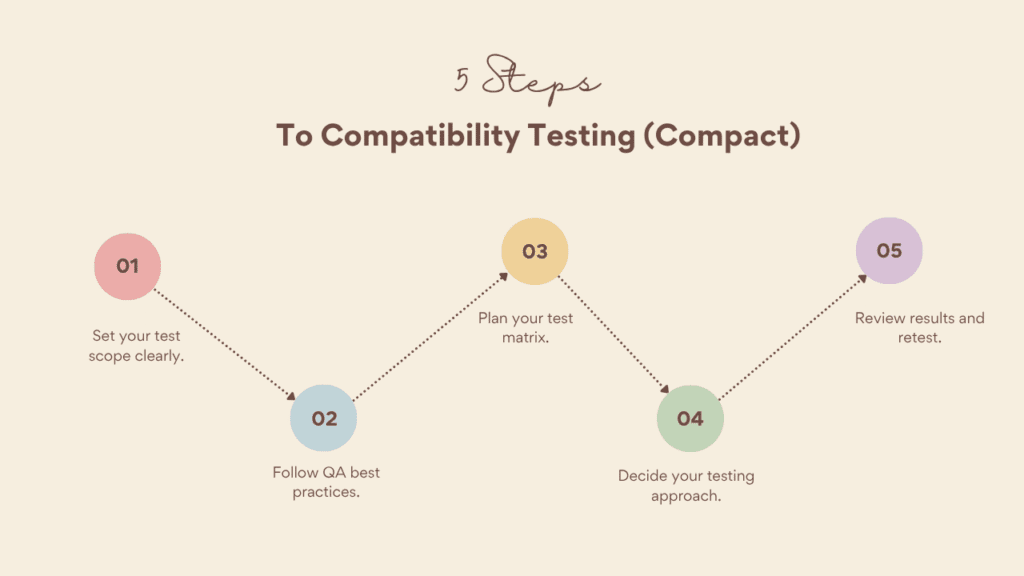
When to Perform Compatibility Testing?
Compatibility testing should be performed at key points during the Software Development Life Cycle (SDLC) to ensure that your application works properly across different platforms, software versions, and hardware. It’s important to conduct tests post-stabilization, once the build is stable and unlikely to change.
Additionally, testing should happen after updates to check how changes in OS, browsers, or third-party software might impact the app. Integrating compatibility testing throughout the development process ensures early identification of issues, allowing for quicker resolution of potential incompatibilities before they become major problems.
Challenges & Benefits of Compatibility Testing
Challenges in Compatibility Testing
Compatibility testing comes with several challenges, especially as the number of devices, platforms, and operating systems continues to grow. With new smartphones and tablets released regularly, it can be hard to decide which devices to prioritize. Updates to OS and browsers can also introduce unexpected issues, and tracking these changes is often time-consuming.
Additionally, physical testing requires setting up equipment in various environments, which can be resource-intensive and costly. Third-party dependencies like libraries, plugins, and tools may also lead to compatibility issues if not updated regularly. Sometimes, environment-specific bugs appear only on certain device models or OS versions, which makes them hard to identify and reproduce.
Best Practices for Compatibility Testing
To overcome these challenges, you should follow best practices in compatibility testing. Start by identifying the most important devices and platforms for your target audience. Begin testing early in the development process and continue to test often. Automate testing tools where possible, such as for cross-browser testing or device testing, to save time.
Use real devices for the most accurate results, but also consider emulators or cloud-based testing platforms to scale your testing efforts. Ensure you test the app under various network conditions like Wi-Fi, 4G, and 5G, as well as slow or unstable connections. Keep track of any issues using a bug-tracking tool, and perform beta testing with real users to catch any environment-specific issues that might be missed during earlier tests.
Types of Bugs in Software Compatibility Testing
- Software compatibility testing reveals platform-specific issues that appear on one operating system, browser, or device, but not on others.
- These issues highlight inconsistencies in application behavior across different environments.
- Common bugs include:
- UI (user interface) related issues such as:
- Alteration in look & feel
- Font size issues
- Alignment problems
- Issues with color and CSS style
- Alteration in look & feel
- Scroll bar problems
- Content and label overlapping
- Broken frames or tables
- UI (user interface) related issues such as:
Real-Life Examples of Compatibility Issues in Software Testing
Website Display Issues on Older Browsers
A popular e-commerce website worked fine on modern browsers but showed distorted images and unclickable buttons on older versions of Internet Explorer (IE 11), causing a poor experience for some users.
Lesson: Test on older browsers to ensure backward compatibility.
Mobile App Crashing on Specific Devices
A social media app ran smoothly on high-end Android phones but crashed on lower-end devices due to excessive memory usage.
Lesson: Test on a wide range of devices, including those with lower specifications.
Banking App Malfunctioning on Older OS Versions
A banking app worked on the latest iOS versions but failed to respond on iOS 10 due to missing functionality in older OS versions.
Lesson: Ensure backward compatibility to support older operating systems.
Responsive Design Failures on Mobile
A news website had navigation issues on budget smartphones because the design didn’t properly account for smaller screens and lower resolutions.
Lesson: Test responsive design across different screen sizes and resolutions.
E-commerce Checkout Problems on Specific Browsers
An e-commerce site’s new payment gateway worked on Chrome but failed in Safari due to JavaScript incompatibility.
Lesson: Test important features like payment gateways across all major browsers
Video Playback Issues on Different Network Conditions
A streaming app optimized for high-speed connections faced buffering issues for users on slower 3G networks.
Lesson: Test app performance across different network speeds to ensure smooth playback.
Application Freezing on Older Hardware
A gaming app froze on older devices with lower specs due to its high-resolution graphics settings.
Lesson: Test on devices with varying hardware specifications to avoid performance issues.
Conclusion
Compatibility testing ensures your software works smoothly across various devices, browsers, and operating systems. It helps identify and fix issues early, providing a seamless user experience. With the growing number of devices and platforms, it’s crucial for maintaining performance across all configurations.
Testing for both backward and forward compatibility is essential to support users on older and newer systems. It prevents issues like crashes or broken features, boosting user satisfaction and brand reputation. By automating tests and testing under different conditions, compatibility testing ensures your app performs reliably, making it a key step in delivering a successful product.
FAQ'S
The purpose of compatibility is to ensure that different systems, devices, or software work smoothly together without any issues. When components are compatible, they can interact seamlessly, which prevents any conflicts that may arise, improving overall efficiency and usability.
This makes sure that everything functions as it should, allowing for a smooth experience. In my experience, understanding the importance of compatibility is crucial for developers and users alike, as it directly impacts how well systems integrate and operate together.
In compatibility testing, it's essential to ensure that a mobile app works well across a variety of platforms and devices. A common example of this test involves checking how the UI elements of the app behave on real devices and emulators. The testing team may identify issues like how the app’s UI scales on smaller screen sizes, which can cause overlap or misalignment of features, leading to a poor user experience.
This ensures that the app functions as intended and corrects any issues before the app reaches its users. By doing this, developers make sure the app can work seamlessly, improving overall experience.
The use of compatibility test is to ensure that a software application functions properly across different browsers, operating systems (OS), mobile devices, networks, and other hardware. By conducting this test, developers can verify that the application works as intended on various platforms without issues. In my experience, performing such tests helps identify potential conflicts and improves the overall user experience, allowing seamless operation across multiple devices and platforms.
Compatibility testing is usually done by QA engineers or software testers. They use real devices and emulators to verify that the application performs well across various environments.
There are several types, including browser compatibility, device compatibility, network compatibility, and operating system compatibility. Each ensures the software works correctly under different conditions.