


In today’s fast-paced digital environment, UI/UX design is crucial for creating interactive and engaging digital products that users love to use. With the attention span now down to just 8.25 seconds, businesses face the challenge of sustaining user engagement within that time frame. The success of an app depends on how quickly it captures attention and how well it facilitates navigation.
A good UI/UX design helps users smoothly interact with an application, increasing conversion rates and ultimately benefiting the business. As UI/UX design professionals, we must focus on designing experiences that make an impact and improve lives, whether it’s reaching millions or simply satisfying clients and users.
Moreover, UI/UX design addresses multiple problems, helping businesses refine ideas and solve issues in ways that are seen and appreciated by users. The process of designing and expressing ideas can be confusing, especially for beginners, as the terms UI and UX are often used interchangeably. But remember, they are sides of the same coin, with distinguishing features that serve to enhance the overall experience.
In fact, as per Forrester Research, a good UI design can raise a website’s conversion rate by up to 200%, while a better UX design can push it to 400%. These numbers highlight how UI/UX design can assist businesses in making an informed decision and ensuring that the product resonates with users and stands out in a crowded marketplace.
What is User Experience?
UX design, or User Experience, is about creating a responsive, user-friendly, and engaging environment for visitors on a website or in an application. It focuses on improving the quality of the experiences users have when they interact with a product. Unlike UI, which deals with visuals, UX design enhances user satisfaction by balancing appeal and functionality.
From wireframing a website to effectively arranging all its aspects to create a smooth user flow, every step in UX design works to meet the objective of delivering a positive experience. This design process also considers how users feel during their interaction, whether it’s positive, neutral, or negative, and aims to ensure that the product experience remains aligned with users’ expectations.
From our experience working with clients like Amazon and Apple, we’ve seen how a well-thought-out UX design can significantly improve customer engagement. These brands have prioritized excellent designs, ensuring their products are both convenient and enjoyable to use, leading to higher customer satisfaction.
In UX, research plays an important role in understanding customers’ behaviors, which helps in creating products that not only look good but also function seamlessly, providing users with the best possible experience.
What Are the Key Elements of UX Design?
Input Controls
One of the core elements of UX design is input controls. These allow users to enter information like their name, location, and other details into a product or website. Common interactive elements in this category include checkboxes, buttons, list boxes, radio buttons, drop-down lists, toggles, and date fields.
These input controls are essential for any product that needs to collect data from users. As designers, we’ve often seen how a small adjustment in the design of these input controls can drastically improve the overall user experience, making it more seamless and convenient for customers to interact with a website or application.
Navigational Components
Another important part of UX design is navigational components. These components help users move around a website or product with ease. Elements like tab bars, menu bars, and calls to action (CTAs) are vital for providing users with quick access to different pages or sections of a site.
In our experience, good navigation is key to user satisfaction, ensuring that users can find what they are looking for quickly and without frustration. By optimizing these components, businesses can create an environment that enhances upscale user experiences.
Informational Components
In UX design, it’s not just about aesthetics and interaction but also about sharing vital information with users. Informational components are those that help organize and present data clearly and concisely. This includes segmentation, organization, and labeling of content. Good architecture helps break down complex information into simpler, more understandable pieces.
For example, headers, callouts, dialogs, and disclosures are often used to highlight important information on the screen. By structuring content this way, businesses can ensure that users have an easier time navigating and comprehending the information they encounter.
Containers
Containers in UX design serve to group elements together and hold the content in cohesive units. This is particularly important for products that need to display multiple functions or topics on one screen. Containers help ensure that everything remains organized and easy to follow.
Using headers, tabs, and other components, containers make it easier for users to engage with the content in a meaningful way. We’ve found that effective use of containers can dramatically improve the clarity and usability of a product, which is why they’re an essential element of good UX design.
Vital Elements of Good User Experience
Research and Prioritization
In the world of UI/UX design, research plays a crucial role in understanding what users truly need. According to studies, 65% of people tend to prioritize using a UX-optimized web app over a basic or bland webpage. A comprehensive UX design is one of the main factors that sets a website apart from its competitors. By focusing on essential elements such as accessibility and responsiveness, a designer can ensure a good user experience for every visitor.
Accessibility and User-Friendliness
One of the vital aspects of a good user experience is accessibility. Designing with user-friendly interfaces ensures that even people with impairments can navigate your site easily. Making your design disability-friendly is not only a requirement but also a positive user experience for everyone.
It’s important to recognize the significance of creating an environment where users can have equal access to all the features, ensuring that no one is left out. Tools and platforms can assist you in making your design accessible and in creating social media campaigns and email marketing materials that appeal to a wide range of consumers.
Mobile Compatibility
With the increasing number of mobile users globally, mobile optimization has become an integral part of UI/UX designing. The obsession with smartphones has overtaken the popularity of laptops, making mobile compatibility essential. A well-designed mobile app or website must be fast, responsive, and offer a seamless experience. Page load time is critical to ensure users don’t bounce off your site. Therefore, a mobile-optimized website plays a huge role in attracting and retaining customers.
Focus on the Audience
The guiding principle in UX design is to always focus on the user. Too often, designers get caught up in creating intricate web design frameworks that prioritize outshining fellow designers instead of focusing on delivering meaningful, great experiences for the users. The goal should always be a blend of style and function. When designing a user-centric site, it’s important to keep in mind how users will interact with common activities, such as navigating the site, and to make those interactions as smooth and intuitive as possible.
Hierarchy in Design
A well-organized hierarchy is a fundamental element of UX design, yet it is often overlooked. The hierarchy approach allows you to structure functionality and information in a way that is natural and intuitive. This involves creating a tree-like structure where each page flows seamlessly into the next.
The right hierarchy makes it easy for users to explore the site and locate what they are looking for quickly. It also helps designers understand how the site operates and prevents the temptation to add unnecessary plugins and themes to achieve a rational design.
What is UI Design?
UI Design stands for User Interface design, which refers to the interactive elements and visual layout of a digital product like a website or mobile app. It involves creating components like buttons, icons, sliders, toggles, and other interactive features that users engage with. The goal is to make a digital product aesthetically pleasing and easy to navigate.
For instance, good UI design enhances the overall user experience by ensuring that the buttons are appealing, the images are well-placed, and the screen layout is intuitive. In my experience, effective UI design makes it easier for users to understand and interact with a product, which increases overall satisfaction.
The UI design process focuses on improving the look and feel of websites and web applications. It’s not just about making things look pretty; it’s about ensuring usability and efficiency. Key elements of UI design include menus, buttons, pages, icons, and other visual components that help users complete tasks quickly and easily.
By focusing on these elements, designers can create a convenient interface that meets the needs of the user. From my own work, I’ve seen that the best UI designs are those that focus on simplicity, where everything from the animations to the color schemes works together to enhance the user experience.
What Are the Elements of UI Design?
Strategy
The first and foremost element in UI design is strategy. This is where everything begins. A good strategy is crucial because it lays the foundation for a successful user experience. It involves understanding the user and market requirements, as well as identifying key pain points.
A well-crafted strategy will help you align your business goals with the design process and will guide you in identifying personas, creating story maps, and crafting user stories. From my experience, this initial phase ensures that your design is purpose-driven and addresses the needs of both your business and your users.
Scope
The next element is scope, which is all about defining what your design should accomplish. It involves defining the features and functionalities that your product will have and making sure they align with your business objectives. You need to consider how to display these elements on the interface effectively.
The scope ensures that your product fulfills both the user’s needs and the business’s goals. When we’ve worked on UI design, setting a clear scope has always made it easier to prioritize key features and create a focused design.
Structure
Another crucial element is structure. This element deals with organizing the design in a way that makes sense to the user. You use user flows to guide the design process, ensuring that the website or product is easy to navigate and user-friendly.
The two main aspects of structure are interaction design, which focuses on making the interface intuitive, and informational architecture, which involves organizing content in a way that improves navigation and understanding. In our experience, a well-thought-out structure creates a seamless user journey that leads to positive interactions with the product.
Skeleton
Skeleton refers to the UI layout where design meets experience. It determines the placement of various product elements on the interface and connects them with the system’s other functions. This is where you use wireframes and low-fidelity mockups to visualize how the design will look and function. When creating the skeleton, we’ve always found that focusing on the usability and flow of the layout ensures that the product is both visually appealing and functional for the user.
Success
Finally, the success element focuses on the user’s point of view. It’s about ensuring that the design not only looks good but also works well from the perspective of those interacting with it. This includes layouts, typography, color schemes, and images.
A key part of success is ensuring that users can easily navigate through the UI, making it easier to find menus, buttons, links, and text. In our experience, this is where attention to detail makes a real difference—creating a visually appealing product that also functions seamlessly is essential to providing a great user experience.
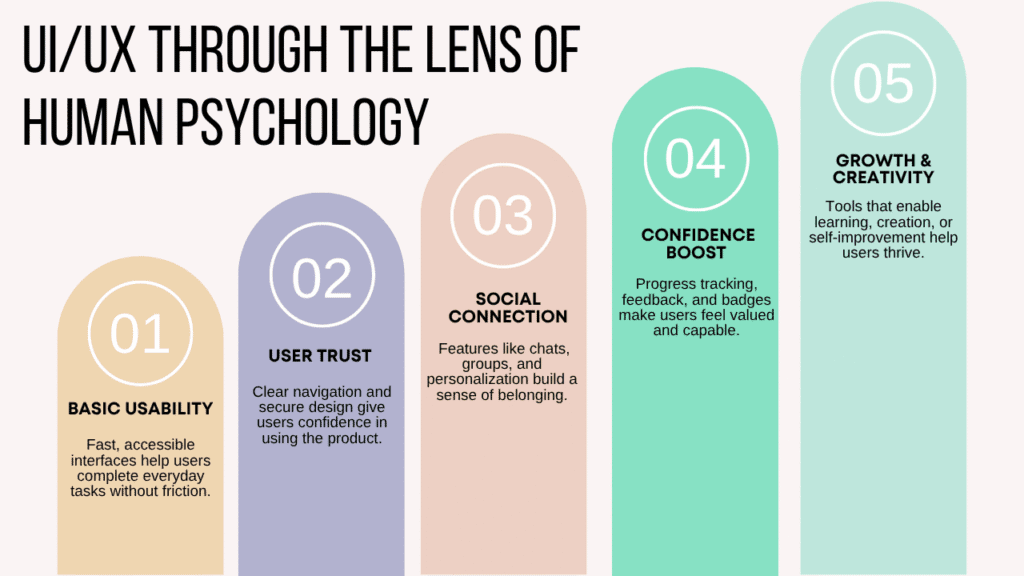
Essential Properties of Well-Designed UI
Clear Navigation
A good UI design starts with clarity. When visiting a website or web app, users should easily find the main menu and navigate through the site without confusion. If users can’t locate the product or service they need, they’ll become frustrated and likely leave. Ensuring the user interface is simple and intuitive helps users complete their tasks quickly, leaving them pleased with the service.
Familiarity with Design Elements
The goal of familiarity in UI design is to make the website easy for users to interact with. By following recognized UI design concepts and using familiar elements like menus and search bars, you ensure a seamless experience. Users expect certain components based on their previous digital experience, and including these elements makes the site more recognizable and easy to use. This approach helps users feel comfortable and reduces frustration.
Visual Appeal
Attractiveness is a crucial part of UI design. An appealing interface enhances how users perceive the brand and encourages them to stay on the site longer. A visually pleasing design can make a significant difference, but it should never distract from usability. A well-designed UI balances aesthetics with functionality, ensuring the site looks good while remaining effective.
Adapting to All Users
Flexibility in UI design means your site should work across various devices and settings, from an old PC to the latest iPad. It should also cater to both novice users, who need an easy-to-learn interface, and experienced users, who may want shortcuts to speed up interactions. By adding accelerators and providing a versatile design, you ensure the site meets the needs of all types of users. In our experience, flexibility in design helps accommodate a wide audience while improving efficiency.
What Are the Benefits of UI/UX Design for Small Businesses?
Retaining Users and Increasing Sales
A well-designed UI/UX design can help small businesses retain users for a long time. By focusing on a user-friendly interface and layout, businesses can ensure that their website or app is easy to navigate, which increases customer satisfaction.
When a user design is effective, it encourages repeat sales and builds a digital experience that keeps customers coming back. As a result, small businesses experience low bounce rates and enhanced brand loyalty, which are key to fostering loyal customers who will return for more.
Boosting Branding and Credibility
UI/UX design is not just about creating an aesthetic look—it plays a vital role in branding. A strong UI/UX design helps businesses establish a solid brand identity and credibility by creating a visually appealing and functional website or app. For instance, by using the right design elements, small businesses can convey their values, improve customer relationships, and inspire loyalty among their users. This, in turn, helps attract new customers, creates better customer experiences, and strengthens their reputation in the market. Let our UI/UX experts help elevate your brand through thoughtful design.
Increasing Conversion Rates
Small businesses can greatly benefit from UI/UX design when it comes to boosting conversion rates. By designing a website that aligns with customer interest and fulfills their needs, businesses can increase the chances of conversion. A seamless user experience makes it easier for prospects to navigate and complete desired actions, like making a purchase or signing up.
Additionally, a well-designed UI/UX will keep users engaged on the site longer, encouraging them to return and even recommend the business to others. In our experience, this direct approach to user interest leads to better overall conversion and long-term growth.
Improving Productivity and Employee Efficiency
UI/UX design doesn’t just benefit customers—it can also improve productivity for a business. A smooth workflow and seamless experiences for employees ensure that they can focus on pertinent matters without distractions. When the internal UI/UX design is optimized, employees can work more efficiently, leading to better productivity rates. By streamlining the tools and tasks, businesses can ensure their employees have the support they need to stay on track and deliver high-quality work.
Enhancing Website Performance and SEO
Another significant benefit of UI/UX design for small businesses is the improvement of their website’s SEO. By optimizing the site load speed and focusing on search engine optimization (SEO), businesses can improve their SERP rankings. A fast-loading website not only improves the user experience but also has a direct impact on revenue by driving more traffic to the site. By offering interactive experiences and easy navigation, businesses can create a strong online presence, which contributes to both better rankings and more conversions.
Conclusion
Investing in UI/UX design is crucial for any business aiming to build brand credibility, increase conversions, and enhance overall customer experience. A well-crafted UI/UX design ensures a seamless, user-friendly interface that not only attracts loyal customers but also boosts productivity and customer retention. By focusing on user needs, businesses can increase SERP rankings and optimize user interactions for higher engagement.
In our experience, whether it’s improving website speed or ensuring mobile compatibility, a well-designed UI/UX can drastically improve your conversion rates and ultimately lead to greater success. Don’t overlook the importance of first impressions; your UI/UX design is often the first interaction users have with your brand, so make it count by offering a design that encourages them to take action.
FAQ'S
UI (User Interface) focuses on visuals and layout, while UX (User Experience) ensures smooth, meaningful interactions. Together, they create a complete digital experience.
Yes, it's in high demand across industries and offers creative freedom, remote opportunities, and solid salary growth for skilled designers.
While coding isn't mandatory, understanding HTML, CSS, or JavaScript can help designers communicate better with developers and improve collaboration.
Beginners can grasp the basics in 3–6 months with consistent learning, but mastering the craft may take a year or more of hands-on experience.
Designers commonly use tools like Figma, Adobe XD, Sketch, and InVision for design, plus Maze or UsabilityHub for user testing and research.