


What Are Testing Tools?
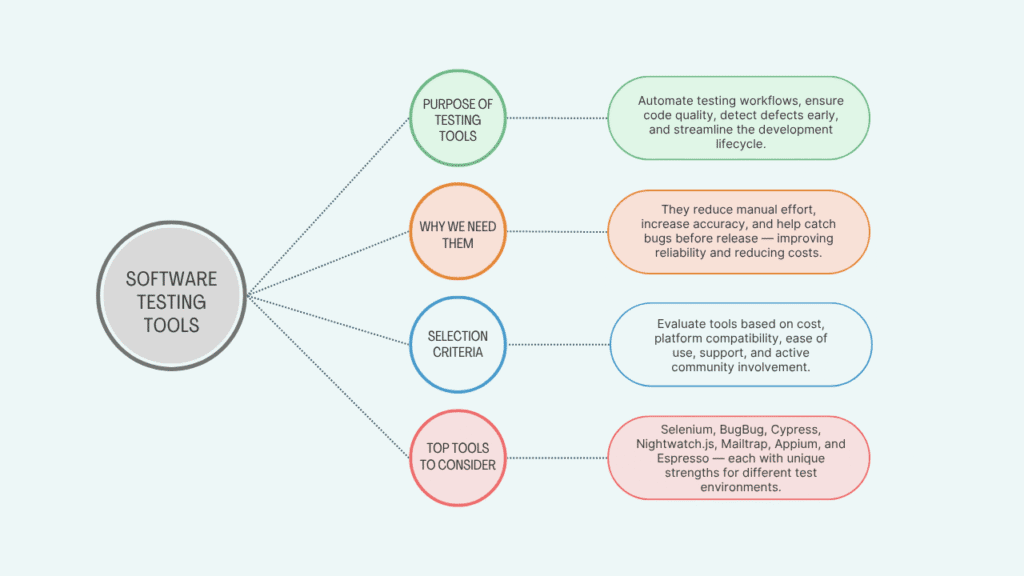
In software engineering, testing tools are essential for ensuring that the software works as expected. These tools help verify that the code meets the specified requirements and performs properly under various conditions. They are used to check the functionality, performance, and security of the system, ensuring it behaves correctly. Whether we’re doing unit testing, integration testing, visual testing, or accessibility testing, these specialized software applications assist in every phase of the testing process.
From defect logging to test execution and test analysis, they help evaluate the software’s efficiency and accuracy. With detailed diagnostics, they provide insights to improve the software, streamlining the entire development process. We’ve used these tools extensively and noticed how they significantly boost the betterment of a project by addressing issues before the software goes live.
Why Do You Need Testing Tools?
Testing tools are essential for verifying that software functions as expected and maintains high software quality and reliability. Manual testing can be labour-intensive and prone to errors, making it inefficient for large-scale software projects. These tools automate many repetitive tasks, ensuring consistent test coverage while also allowing us to simulate real user conditions.
With the ability to identify breakdowns and bottlenecks early in the development cycle, they help catch issues before the software goes live. This results in a lower cost for fixing bugs, improved user satisfaction, and better adherence to safety and compliance requirements.
From our experience, using these tools has been a game-changer for increasing efficiency and preventing costly post-release fixes. To take your quality assurance to the next level, explore our professional QA and software testing services.
Factors to Consider When Choosing a Software Testing Tool
Understanding the Cost
When choosing a testing tool, cost is one of the most critical aspects to consider, as it directly relates to your budget and end-user requirements. Depending on the size of your team or your usage choice, you’ll need to opt for the best solution.
Compatibility Matters
Your testing tools should be able to run and execute test cases efficiently across cross-browser platforms, saving time from running them manually. This is key to improving your overall testing workflow.
Focus on Ease of Use
Choosing a user-friendly testing tool is essential. If the tool is not intuitive, your test process will become time-consuming, and you’ll need to put extra effort into getting accustomed to it.
The Importance of Technical Support
The vendor of the testing tool should offer comprehensive technical support. A good testing tool should include resources like FAQs, live chat, phone calls, email support, online user guides, product documentation, and help desk tickets.
Community Engagement
For software testers, joining a community of like-minded professionals is beneficial. It’s crucial to stay updated on the trending software testing tools and techniques in the industry, especially for independent testers who might be working alone.
Top 7 Software Testing Tools
Selenium in Software Engineering
Selenium is an open-source Web User Interface automation tool used for testing software. Created by Jason Huggins in 2004, it has become a popular choice for automating web applications across multiple operating systems, including Linux, Macintosh, Windows, and Solaris.
It helps developers automate repetitive tasks in testing, ensuring that applications run as expected across different platforms and browsers. With its open-source nature, Selenium has gained wide adoption due to its flexibility and cost-effectiveness.
Prerequisites for Selenium
Before you begin using Selenium, there are a few prerequisites to consider:
- Java (JDK): The Java Development Kit is required to run and configure Selenium.
- Eclipse Packages: Install Eclipse to use Selenium with the IDE.
- Selenium Clients and WebDriver: You will need to install these components for proper integration with Selenium.
- Language Bindings: Depending on the programming language you use, make sure the appropriate language bindings are set up.
- Configure Selenium in Eclipse: After setting up the required components, you must configure Selenium in the Eclipse environment for automation.
Key Features of Selenium
Selenium offers a range of features that make it a preferred tool for test automation:
- Open-source framework for automating web applications.
- Supports multiple programming languages such as Java, Python, and C#.
- Allows for cross-browser and cross-platform testing, ensuring applications work across different environments.
- Easily integrates with CI/CD tools and frameworks, making it a great choice for continuous integration.
- Highly customizable and extensible through plugins and libraries.
- Supports parallel test execution and distributed test execution via Selenium Grid.
- Headless browser testing is supported, allowing tests to be run without opening a browser window.
- It has a large community and robust ecosystem support, offering resources for troubleshooting and innovation.
Advantages of Selenium
Selenium brings several advantages to the testing process:
- It supports automation across different platforms and browsers, which reduces the manual effort required for testing.
- The tool does not require learning a new language since it works with languages like Java, Python, and C#.
- Integration with Selenium Grid allows for parallel test execution, saving time during testing.
- It is widely used for functional test automation, and can be integrated with tools like Docker, Maven, TestNG, JUnit, and Jenkins.
Disadvantages of Selenium
Despite its many benefits, Selenium does come with a few drawbacks:
- It cannot support continuous testing or sprint automation, which makes it less suitable for certain types of testing scenarios.
- The initial setup and configuration can be complex, with a high initial cost in terms of time and resources.
- It can be difficult to use without adequate technical support, especially when dealing with complex configurations or issues.
BugBug in Software Engineering
BugBug is a browser-based testing tool designed for QA teams and developers involved in web application testing. It allows users to create tests and run tests directly within the browser, making the testing process more efficient and accessible. One of its key features is that it requires no coding, making it user-friendly for both technical users and non-technical users.
Prerequisites for BugBug
To start using BugBug, there are a few prerequisites:
- You must have Google Chrome installed, as BugBug relies on Chrome plugins for test creation and execution.
- A free BugBug account is required to access and use the tool.
- Ensure you have the proper setup to run web application tests in a browser-based environment.
Key Features
BugBug offers a range of features that streamline the testing process:
- No-code or low-code test creation with an intuitive visual interface for test automation.
- The ability to record and replay tests, making it easy to automate test scenarios without writing code.
- Test scheduling to automate test execution at specified times or intervals.
- Cloud execution for scalable testing, allowing for lightweight and simple browser-based automation.
- Test versioning and change tracking to manage different test versions.
- Built-in email alerts and test reports for easier monitoring of test progress and issues.
Advantages of BugBug
There are several benefits to using BugBug for web app testing:
- Easy test scheduling and detailed test reporting allow for streamlined test management.
- It offers unlimited tests, local test runs, and test suites for unrestricted testing capabilities.
- The test recorder helps automate testing without the need for manual coding, making it a valuable tool for small QA teams.
- BugBug reduces flaky tests and false negatives with intelligent wait times that adapt dynamically during tests.
- Integrations with tools like Jira, GitHub, Bitbucket, Trello, GitLab, Azure DevOps, Jenkins, and Microsoft Teams simplify collaboration and reporting.
Disadvantages of BugBug
Despite its benefits, BugBug has some limitations:
- Mobile testing and cross-browser testing are limited, so it may not be suitable for all testing needs.
- It primarily focuses on web app testing, which means it’s not the best choice for mobile or cross-platform environments.
Cypress in Software Engineering
Cypress is an open-source frontend software testing tool used to test web apps. It’s ideal for testing JavaScript and web components that run in a browser. Cypress can be run on multiple platforms, including Windows, macOS, and Linux. It helps developers automate testing, ensuring that modern web applications work as expected in real time.
Prerequisites for Cypress
To use Cypress for automation, you need to meet these prerequisites:
- Windows 7, Linux Ubuntu, or macOS must be installed.
- Ensure your system supports automation through the required Cypress systems.
Key Features
Cypress offers a variety of features that make it a go-to tool for web application testing:
- Fast, real-time testing for modern web applications.
- Built-in test runner with time travel debugging, allowing for efficient debugging during tests.
- Automatic wait for elements and actions, which helps eliminate timing issues during tests.
- JavaScript-based, making it ideal for frontend developers.
- Real-time reloading and instant feedback to track test progress as it happens.
- Easy integration with CI/CD pipelines for continuous testing.
- Built-in screenshot and video capture features for more thorough test analysis.
- Strong debugging tools with browser dev tools support.
Advantages of Cypress
Using Cypress brings several advantages, especially for frontend testing:
- It supports cross-browser testing, ensuring that web apps work across different browsers.
- Debug tests in real time, allowing for quick issue resolution.
- Easy testing setup, reducing the complexity often associated with traditional testing tools.
- It supports modern web technologies used in various industries, making it suitable for cutting-edge applications.
Disadvantages of Cypress
Despite its many advantages, Cypress has a few limitations:
- It does not support mobile testing, making it unsuitable for testing mobile applications.
- Multi-tab testing is not supported, limiting certain test scenarios.
- A plugin is required to upload and download files, which adds complexity to some use cases.
Nightwatch.js in Software Engineering
Nightwatch.js is an automated software testing framework powered by Node.js. It is an open-source tool designed for performing end-to-end testing on web applications. With its support for Selenium and WebDriver protocols, Nightwatch.js makes testing easier for both UI and API. It is ideal for developers and QA teams who need an efficient and streamlined approach to testing web apps with minimal code.
Prerequisites for Nightwatch.js
Before getting started with Nightwatch.js, you need to install the following prerequisites:
- Node.js (for running the framework)
- Node Package Manager (npm) to manage the dependencies and packages needed for Nightwatch.js.
Key Features
Nightwatch.js offers several features that make it an effective testing tool for developers:
- End-to-end testing framework built on JavaScript.
- Built-in support for Selenium and WebDriver protocols.
- Easy test writing and structuring using a simple syntax, making it user-friendly.
- Supports cross-browser testing and parallel execution, improving test efficiency.
- Comes with a built-in test runner and CLI tools for better test management.
- Supports Page Object Model, which allows for modular testing.
- Easily integrates with CI/CD pipelines for continuous integration and testing.
- Suitable for both UI and API testing.
Advantages of Nightwatch.js
Nightwatch.js offers several advantages that can improve the testing process:
- Low code maintenance and better performance compared to other frameworks.
- It allows for third-party integration with tools like Cucumber, enabling the creation of a BDD setup.
- The clean syntax helps developers write tests easily and efficiently.
- Nightwatch.js includes its own library and testing frameworks, making it easier to maintain and extend.
Disadvantages of Nightwatch.js
Despite its many features, Nightwatch.js also has some limitations:
- Since it uses its own testing frameworks, it doesn’t provide much flexibility for unit test frameworks.
- There is no support for BDD style syntax, which may limit its use for teams who prefer this approach.
Mailtrap by Railsware in Software Engineering
Mailtrap is a powerful email testing tool used primarily in the world of software engineering. It allows developers to inspect and debug emails within staging, development, and QA environments without actually sending those emails to real recipients. This helps to avoid any risk of spamming while still providing essential feedback on email rendering and delivery.
With Mailtrap, users can ensure that their email templates, HTML, and CSS are compatible with various mailbox providers. Additionally, it helps analyze Spam Scores and check for any issues related to IP blacklists, which are crucial to maintaining a good email reputation.
Prerequisites for Using Mailtrap
Before you can start testing your emails with Mailtrap, you need to follow a few simple steps:
- Select your integration from over 20 code samples or copy the SMTP credentials.
- Paste the configuration details into your project.
- Run your email sending script to receive the email in your inbox for inspection.
Key Features of Mailtrap
Mailtrap offers several key features that make it an essential tool for any software engineer working with email testing. Some of the key features include:
- Safe email testing environment without the risk of sending real emails.
- The ability to catch and inspect emails during testing.
- Tests for HTML/CSS rendering in emails to ensure compatibility.
- Automated email validation and deliverability checks.
- Integration with API and SMTP for easy automation.
- Shared inboxes for team collaboration and better communication.
- Real-time email preview and spam score analysis to catch issues early in development.
- Supports staging and development workflows seamlessly.
Advantages of Using Mailtrap
The advantages of using Mailtrap are extensive, especially for teams looking to streamline their email testing process. Some of the main advantages include:
- Covering code with tests to run automated checks via the Testing API.
- Verify different email aspects such as design and deliverability.
- Debug your sending script and HTML template to ensure they work correctly before sending to real users.
- Compare revised emails with previous versions to track changes and improvements.
- Access to in-depth analytics and monitoring capabilities for better control.
- Weekly critical alerts and 24/7 support from email deliverability experts to help troubleshoot any issues.
Disadvantages of Mailtrap
While Mailtrap is an excellent tool, it does have some limitations. These include:
- Strips out <script> tags for security reasons, which may limit certain advanced testing scenarios.
- Renders emails in a way similar to browsers, which may not perfectly represent how emails appear in actual email clients.
Appium in Software Engineering
Appium is an open-source software testing tool that helps test a wide variety of mobile applications. Whether it’s for native applications, hybrid applications, or mobile web apps, Appium provides a reliable and freely available automation framework. As a QA professional, this tool allows you to perform automated app testing on platforms like Windows, Android, and iOS.
Prerequisites for Appium
Before you can start using Appium for testing, there are a few prerequisites you’ll need to install:
- Java (JDK)
- Eclipse IDE
- Android Studio
- Selenium Server JAR file
- Appium Desktop Client
These are essential for the proper setup and execution of tests within the Appium framework.
Key Features of Appium:
One of the main reasons Appium is so popular is because of its key features. These features include:
- Open-source automation tool for mobile app testing.
- Supports Android, iOS, and hybrid apps.
- Works with multiple languages via WebDriver protocol.
- Cross-platform test reuse between Android and iOS.
- Seamless integration with CI/CD systems and cloud platforms.
- Ability to test using gestures, touch actions, and real device testing.
- Native support for testing on emulators and simulators.
- Community-driven and actively maintained, meaning continuous updates and support.
These features make Appium a versatile tool for both beginners and advanced testers.
Advantages of Using Appium:
There are several advantages to using Appium for your mobile app testing needs:
- Free of cost as it is an open-source tool.
- Supports Chrome web browsers, as well as native, hybrid, and web applications.
- It works seamlessly on both Android and iOS platforms, making it an excellent choice for cross-platform testing.
- You can also use it alongside the Robot framework to extend your testing capabilities.
Disadvantages of Appium:
While Appium is a great tool, there are some disadvantages that you should be aware of:
- The test execution can sometimes be slow, especially when testing complex apps.
- Switching between web apps and mobile apps is not always possible in Appium.
- If you’re testing on iOS devices, you’ll need an active paid Apple developer account, which can be an extra expense
Espresso in Software Engineering
Espresso is an Android app testing framework designed specifically for User Interface testing. Developed by Google, Espresso makes it easier for developers to write automation test cases for UI testing. One of its strengths is that it also supports black box testing, allowing testers to focus on testing the functionality of the app without diving into its code.
Prerequisites for Espresso
To start using Espresso, developers must first ensure that they have the following systems in place:
- Java (JDK)
- Android Studio
- Android SDK
- Gradle Build Tool
These are essential for setting up the testing environment and running tests efficiently on Android apps.
Key Features of Espresso
Espresso comes with several key features that make it a go-to tool for Android-native UI test automation:
- Fast and reliable test execution directly within the Android app process.
- Strong integration with Android Studio, providing a seamless experience.
- Automatically synchronizes with UI actions to ensure smooth testing.
- Easy test creation using Java or Kotlin, making it accessible to developers with different skill sets.
- Ideal for unit, integration, and UI testing, covering all levels of testing.
- CI integration with Gradle-based projects for continuous testing.
- Supports test recording and playback to quickly create and repeat tests.
Advantages of Using Espresso
There are some distinct advantages to using Espresso for Android app testing:
- It focuses on testing user interfaces, making it ideal for UI-centric apps.
- The tool is highly fast and provides reliable results.
- Espresso offers seamless integration with Android Studio, ensuring that developers can run tests directly within their development environment.
- Supports test recording and playback, which speeds up the testing process.
Disadvantages of Espresso
However, there are some disadvantages to consider when using Espresso:
- Espresso can only test the user interfaces and does not support testing other app features.
- It does not support the two programming languages, Kotlin and Java, in its full extent for all use cases.
- iOS automation testing is not possible with Espresso, meaning it is limited to Android only.
Conclusion
In today’s fast-paced software development environment, choosing the right testing tools is critical to ensuring product quality, user satisfaction, and long-term success. From open-source giants like Selenium and Cypress to beginner-friendly platforms like BugBug and specialized tools like Mailtrap and Appium, each serves a unique purpose in automating and improving the testing process.
By understanding your project’s requirements, evaluating tool compatibility, and prioritizing usability and support, development and QA teams can streamline workflows, reduce errors, and deploy with confidence. As the demand for reliable, efficient, and scalable applications grows, investing in the right software testing tools is no longer optional. It is essential.