


When we’re building something like a custom-built car, we focus on the engine, the interior, and the paint color. But after it’s all done, we want to know, does it actually run smoothly? Does it handle the corners well, and does it give us the fuel efficiency we expected? This is where Verification and Validation come into play in software testing. Verification makes sure we’re building the software the right way, just like checking if our car is built according to our blueprint.
On the other hand, Validation answers the question, “Are we building the correct software?” In our experience as developers, it’s easy to get caught up in just making the software run, but the real test is whether it meets the actual needs and expectations. Both steps, Verification and Validation, are crucial for delivering the right product, just like a well-built, smoothly running car. They ensure not only the correct construction of the software but also that it will perform the way users need it to.
60-Second Summary
Verification testing ensures the software is built correctly, aligning with design specifications and business requirements through static methods like reviews and inspections.
Validation testing confirms the software meets user needs by executing real-world tests such as system testing and user acceptance testing (UAT).
Verification occurs in early SDLC phases; validation happens post-implementation, focusing on usability, performance, and functionality.
A strong V&V strategy includes static reviews, real-user feedback, risk-based testing, and alignment with user stories.
Together, verification and validation reduce defects, enhance software quality, and ensure the final product delivers real value.
What Is Verification Testing?
When it comes to verification testing, the main idea is making sure that the software is being built correctly. We’re not worried about whether it works yet, but whether everything is following the specified design and requirements. It’s like checking if the blueprint is being followed exactly as planned. In our experience, this step can save a lot of time by catching mistakes early before they become bigger issues.
Verification testing helps confirm that the software architecture is sound, the functions work as they should, and that everything adheres to the design specifications. This process keeps the development on track and makes sure we’re heading in the right direction before we actually run the code.
Advantages of Verification Testing
- Verification testing brings several advantages to the development process.
- By verifying the software early and frequently, it helps reduce the number of bugs and defects that may appear in later stages.
- This early detection allows developers and product managers to gain valuable insight into what might need to be developed or improved, making the product better over time.
- Even if issues can’t be solved immediately, verification helps estimate and prepare for emerging issues, so teams can handle them before they turn into bigger problems.
- Verification ensures that the software is aligned with both business requirements and customer expectations, cutting down on unnecessary work as development continues.
- Verification helps with quality and reduces the risk of costly rework later in the project, ultimately leading to a smoother development cycle.
When Should You Perform Verification Testing in SDLC?
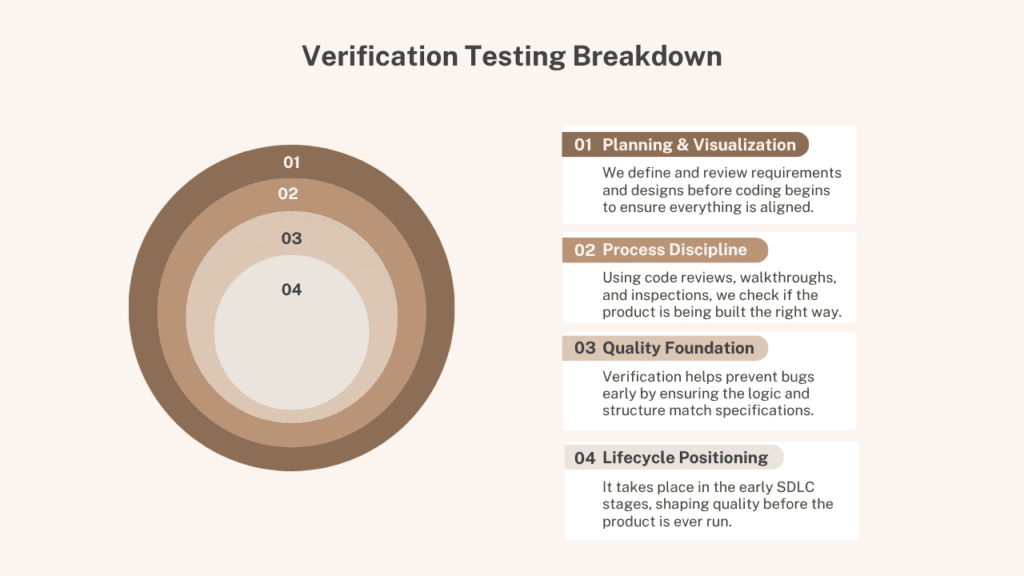
In the Software Development Life Cycle (SDLC), verification testing plays a crucial role throughout the process. It starts even before any code is written. During the early stages, such as the planning phase, design documents and requirement specifications are carefully reviewed to ensure the project is aligned with business needs and is technically feasible.
This sets the foundation for verification activities that continue into later phases. The goal is to ensure that the product matches the initial requirements and specifications before moving on to actual development. When a module or component is developed, verification testing checks if it behaves as intended, complies with coding standards, and aligns with the design.
As the project progresses into the development phase, verification testing continues, focusing on areas like unit testing and integration testing. These ensure that each component functions as expected and integrates smoothly with other modules. Even during the testing phase, some verification activities like code reviews and system integration testing are still carried out.
This is done to confirm that the system functions according to its original design before moving into user validation (UAT). The testing phase helps ensure that modifications, enhancements, or bug fixes don’t break any existing features, keeping the core functionality intact. By performing verification testing at multiple stages, teams can isolate and resolve issues early and avoid introducing new errors as the project progresses.
Process for Verification Testing
Initial Software Requirements Review
Verification testing starts with a thorough review of the software requirements. The aim is to ensure the requirements are clear, complete, and unambiguous. Any ambiguities or missing details are flagged early on to prevent misinterpretations during the development phase, which helps ensure the software aligns with the intended goals.
Evaluating System Design Alignment
Once the requirements are validated, the next step is to evaluate the system design against the defined requirements. This includes reviewing both high-level and low-level design documents. The architecture and solutions should align with the intended purpose of the software to confirm that the design will deliver the required functionality.
Source Code Inspection and Static Analysis
In this phase, source code is inspected through static analysis. This allows the team to identify syntax errors, verify compliance with coding standards, and uncover any potential logical flaws. The use of peer reviews and automated tools ensures that code quality is maintained early on, preventing problems in later stages.
Documentation Validation
After the code review, it’s time to ensure that all documentation, such as functional specs, test plans, and design documents, are correct and consistent. This step helps confirm traceability and alignment with requirements, ensuring that every necessary detail is properly documented for future stages of testing.
Collaborative Evaluations by Cross-Functional Teams
Next, team-based evaluations, including walkthroughs and inspections, are conducted by cross-functional teams. These reviews help identify any gaps or weaknesses that might be missed by individuals working alone. It ensures that all artifacts, like architecture designs, interface definitions, and test cases, are thoroughly examined from various perspectives.
Functional Testing and Integration Assurance
The next phase includes unit testing during the development stage, where individual software components are tested to ensure they function properly. Integration testing follows, verifying that different modules interact correctly, and ensuring proper data flow and no issues with system interactions.
Reporting and Tracking Progress
Finally, report generation helps track the progress of verification testing. It documents results, identifies any defects, and ensures compliance with the established standards. Any issues found are resolved through defect resolution and re-verification, and once the verification is complete, the team is ready for validation or integration testing.
What Is Validation Testing?
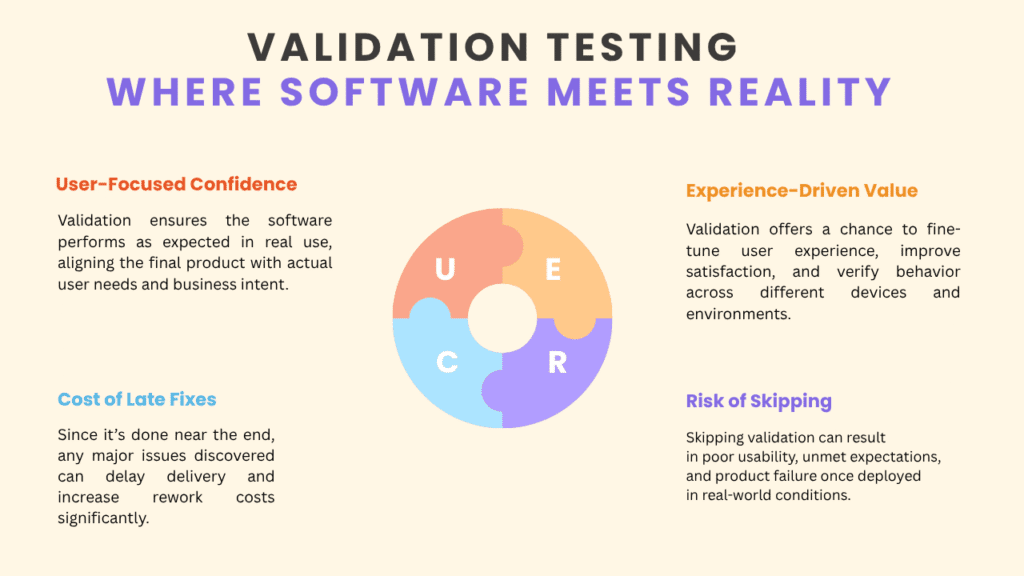
Validation testing is an essential part of the software development life cycle that ensures the final product meets the needs and expectations of the end-user. Unlike verification, which checks if the product is built right, validation confirms whether the product solves the right problem.
This testing focuses on ensuring that the software behaves as expected in a real-world environment, addressing not only technical concerns but also how well it meets user needs. To ensure your product performs exactly as your users expect, our Software Quality Assurance Services support real-world validation across devices, browsers, and business goals. For example, if we’re building a website, validation testing involves checking if the site loads quickly and is easy to navigate, alongside making sure it delivers the value users expect.
It’s about confirming that the product delivers the value promised and that it matches the specifications of the customer or stakeholder. By running tests, tracking quantifiable results, and evaluating the system’s performance in a real-world scenario, validation gives us confirmation that the software truly meets its requirements and solves the intended problem for the user.
Advantages of Validation Testing
- Validation testing ensures the software is practical, usable, and aligns with user expectations.
- It helps identify bugs that were missed during verification testing, especially those related to real-world scenarios and the system’s behavior under different conditions.
- It confirms the product meets business and user needs, ensuring features satisfy end-users and improve satisfaction.
- Ensures cross-platform and cross-browser compatibility, making sure the software works on various devices, operating systems, and browsers.
- Includes stress testing, usability testing, and performance evaluation, identifying slow response times, bottlenecks, and inefficiencies before the release.
- Provides confidence for the deployment, knowing the product is stable, efficient, and ready for the market.
When to Perform Validation Testing in SDLC?
Validation testing should be done during the later stages of the Software Development Life Cycle (SDLC), when the product is nearly complete and ready to be tested from the end-users’ perspective. Once all the modules and components are integrated and the system is functionally complete, this phase is critical in ensuring the product behaves as expected in a real-world context. It is a part of User Acceptance Testing (UAT) where users or stakeholders confirm the product meets their needs before it moves to production and release.
Validation testing happens after key steps like unit testing and integration testing have been completed. During the design and development phase, verification testing ensures that the software meets the correct specifications. But validation testing kicks in once the software is ready to interact with real-world users, ensuring the product is stable, usable, and aligns with business objectives.
This testing includes tasks like beta testing, gathering feedback on usability, and ensuring the software is ready for deployment in a production-like environment. It may even continue post-deployment with monitoring and analyzing user feedback to ensure the software meets evolving user needs in a live environment.
Process for Validation Testing
Requirement Analysis and Test Case Design
The process for validation testing starts with requirement analysis to ensure that the requirements are clear, complete, and testable. Once the requirements are validated, we define test cases based on real-world use cases and user expectations. These test cases reflect how actual users will interact with the software under various situations, including edge cases and high-stress conditions. The goal is to ensure that the software delivers the intended value and performs as expected in a real-world environment.
Conducting Manual and Automated Tests
Once the test cases are designed, we conduct manual or automated tests to evaluate the functionality, performance, and security of the software. These tests help us identify any issues with user interactions, workflows, and system behavior. It’s crucial to test the complete, integrated application to ensure that all modules work together smoothly and that the data flow is correct.
This step is critical to ensure the software behaves cohesively and all parts of the application function as expected when interacting with each other. These steps align with the verification process, which includes unit testing, static analysis, and code reviews to check that the software is being built according to the requirement specifications, design documents, and source code.
User Involvement and Feedback
Involving real users is a key part of validation testing. This is where User Acceptance Testing (UAT) and beta testing come into play. Through these methods, users provide feedback on the software’s usability, functionality, and overall experience. This feedback helps us ensure that the software is intuitive and meets user expectations.
Any issues discovered during these tests are documented, and the development team works to fix them. After resolving the issues, we re-execute the tests to verify that the fixes were effective. If needed, we conduct walkthroughs and inspections to ensure the product aligns with its intended design.
Iterative Testing and Stakeholder Approval
The validation testing process is iterative. As new features are added or issues are fixed, we repeat validation tests to confirm that these changes haven’t negatively impacted the system’s functionality or usability. This process continues throughout the software’s lifecycle, ensuring that the product remains aligned with the end-user’s needs and expectations.
It’s also important that the verification phase, which ensures the software is being built correctly, complements the validation phase, which ensures the final product is both functional and user-ready. Once defect resolution is complete and fixes have been validated, we move to the reporting phase, where results are shared with stakeholders for approval to move forward to integration or further stages.
Verification Vs Validation Testing: Key Differences
| Aspect | Verification | Validation |
|---|---|---|
| Definition | Ensures the product is built right according to specs | Confirms the product meets user needs |
| Focus | Process-oriented | Product-oriented |
| Type of Testing | Static: reviews, inspections, code reviews | Dynamic: black box, white box, functional |
| Performed During | Early stages before execution | Later stages after implementation |
| Methods Used | Reviews, walkthroughs, desk-checking | UAT, system, non-functional testing |
| Performed By | QA team, developers | QA team, end users |
| Goal | Ensure software meets specifications | Ensure product satisfies customer requirements |
| Bug Detection | Finds early development bugs | Finds real-world usage bugs |
| Timing | Before validation | After verification |
| Execution | No software execution | Involves software execution |
| Human vs Computer | Human-driven reviews | Computer-driven testing |
| Stability | Opinion-based, may change | Data-driven, more stable |
| Performance | Detects ~50-60% of defects | Detects ~20-30% of defects |
How to craft an Effective V&V Strategy for Your Testing Process
Building a Strong V&V Strategy for Your Testing Lifecycle
A solid V&V strategy is essential for ensuring our software is both technically sound and a good fit for the users. By defining checkpoints throughout the SDLC, we can address potential issues early and reduce risks, improving the quality of the final product. We start by clearly identifying the verification activities (to confirm we’re building the product correctly) and validation activities (to confirm we’re building the right product). This approach ensures that requirements and design are verified early, while user acceptance and real-world testing come later in the process.
Incorporating Static Reviews and Inspections
Static reviews, walkthroughs, and inspections should be part of our process from the very beginning. These verification activities are critical in the early stages, helping us catch things like design flaws and unclear requirements before any code is written. These activities ensure that the foundation of our product is solid, and we’re getting things right from the start. Focusing on static testing early can help us identify and fix issues before they become major problems down the line.
Aligning V&V with User Stories and Acceptance Criteria
It’s important to align our V&V strategy with user stories and their corresponding acceptance criteria. Verification ensures that each user story is implemented according to technical requirements, while validation confirms that the final product actually meets user expectations and provides value. This approach helps bridge the gap between the technical specifications and real-world needs, making sure that our software does what it’s supposed to do.
Engaging Real Users and Focusing on Risk-Based Testing
Incorporating real users or personas into our validation plan is crucial. We engage users during User Acceptance Testing (UAT) to gather feedback on usability and how well the software solves user problems. At the same time, we prioritize risk-based testing to focus on the high-risk areas such as core features or components with significant business impacts. This ensures that we are not only addressing potential issues but also making the most efficient use of our time and resources while testing. Balancing automation for repetitive tasks and manual validation for critical aspects, like usability, is key to successful testing.
Verification and Validation in Software Testing
Verification Testing Example
- Verification testing ensures the system meets the requirements and design specifications.
- We check if users can securely log in, view their bank balance, and perform secure transactions.
- We verify that the code is written to standards, protecting personal data and avoiding bugs or mistakes.
- We include requirements checks, design reviews, and code inspections to ensure the software is built right.
- This helps us detect any issues before the system is used by users.
Validation Testing Example
- Validation testing ensures the online banking system works as intended in real-world use.
- System testing verifies if account balances update correctly when money is transferred.
- User Acceptance Testing (UAT) involves bank customers testing the system for ease of use and to meet their expectations.
- We test if the system works across devices like smartphones, tablets, and computers, and different browsers such as Chrome, Safari, or Firefox.
- Real-world testing simulates scenarios like transferring money quickly to avoid overdraft fees.
- We collect feedback from users to ensure the system is functional and aligns with their needs and expectations.
Verification Vs Validation Testing: Common Myths
Myth 1: Verification and Validation are the Same Thing
Reality: While verification and validation are related, they serve different purposes. Verification ensures that the software is being built according to the design, requirements, and standards, focusing on the process of development. Validation ensures that the product meets the user’s needs and works as intended in real-world scenarios. Understanding the distinction between the two is key to maintaining clarity in our development process.
Myth 2: Only Testers are Responsible for Verification and Validation
Reality: Verification and validation are collaborative activities involving everyone on the team. Developers, product owners, business analysts, and users all play an important role. Verification involves checking requirements and design through static reviews, inspections, and code reviews. Validation requires user feedback to ensure the product meets user expectations and solves their problems. It’s a team effort throughout the development process.
Myth 3: Verification and Validation Happen Simultaneously
Reality: Verification and validation occur at different stages in the SDLC. Verification happens early in the development process during design, coding, and testing, while validation takes place later, after the product is nearly complete or finished. Validation confirms that the product works as expected in real-world scenarios, through methods like user acceptance testing (UAT), system testing, and beta testing. Although there can be some overlap, these two processes generally happen at separate stages.
Myth 4: Verification is Less Important Than Validation
Reality: Both verification and validation are equally important for ensuring a successful product. Verification ensures the software is built correctly, preventing mistakes and bugs early in the development process, while validation ensures the final product meets user expectations. Skipping verification can lead to serious flaws in the design or implementation, while skipping validation could result in a product that doesn’t meet the real-world needs of the users. Both processes complement each other in achieving a high-quality product.
Conclusion
In the software testing lifecycle, both verification testing and validation testing play vital roles in ensuring software quality and user satisfaction. While verification ensures we build the software right, validation confirms we build the right software. By combining static reviews, user acceptance testing, and real-world feedback, we can deliver high-performance, bug-free solutions. Embracing a solid V&V strategy enhances usability, reduces risks, and ensures long-term product success.
FAQ'S
From our experience in software projects, UAT is where real users step in to confirm if the product truly meets expectations; this makes it pure validation. Unlike unit testing, integration testing, or system testing, which follow strict requirements and specifications, UAT happens later and is usually the only time full validation is actually performed. Reviews and other structured testing activities fall under verification because they are based on planned steps, not live usage. In most projects, UAT becomes the key example of how a product is tested from a user’s viewpoint, making it crucial for catching anything missed in earlier time-bound verification stages.
In API projects, verification is about making sure the software is built correctly based on technical requirements and specifications, while validation checks if it actually meets the user’s needs and expectations. We always assess whether the final product works as intended and conforms to what was planned, ensuring both process and outcome are aligned.
Validation testing checks if software outputs are factually correct, but without verification, we can't be sure those results are even right or true; both steps must work together to prove that what we deliver actually works as intended and makes sense.
In software testing, an RTM is a document that shows the relationship between requirements and testing artifacts, helping us prove that every requirement has been fulfilled by linking it to related tests, test results, and any issues we’ve documented.
A QA Validation Specialist is the professional who checks finished products through testing, assessing, and inspecting to ensure every product release, implementation, and integration meets company standards with complete validation from start to finish.